Ruler: A Playful Color Font for Educational and Creative Projects
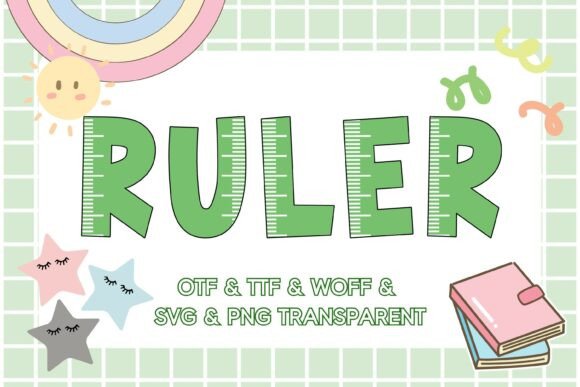
When you're working on a project for a school, a children's brand, or a community bulletin board, the right typeface does more than just display words. It sets a tone. It communicates a feeling before a single sentence is read. This is where the Ruler font steps in, not as a conventional typeface, but as a design asset that brings a specific, tactile personality to your work. It’s a color font, or more technically an OpenType-SVG font, designed to look exactly like a classic green plastic ruler. The letters appear as if they are printed directly onto that familiar, ridged surface, complete with measurement markings and a bright, cheerful green hue.
The visual character of Ruler is unmistakable. It’s playful, nostalgic, and instantly recognizable. This isn't a font for long paragraphs of body text. Its strength lies in its ability to grab attention and inject a sense of fun and structure into headlines, titles, and short bursts of text. The style leans heavily into a tactile, educational aesthetic. Think of the excitement of a new school year, the hands-on feel of a classroom project, or the organized creativity of a maker’s workshop. That’s the energy Ruler brings to a design. It’s a creative font that functions as both typography and illustration.
Where This Creative Font Truly Shines
Understanding where a specialty font like Ruler works best is key to using it effectively. Its personality is strong, so context is everything. In the realm of branding and marketing, it’s a natural fit for businesses and creators who operate in the education space. A tutoring service, a teacher’s blog, a company selling school supplies, or a children’s museum could use Ruler in their logo design, social media graphics, or promotional posters to instantly communicate their focus. It builds brand recognition through a unique and memorable visual hook.
For publishers and content creators, Ruler offers a fantastic way to design engaging chapter headings in a children’s activity book, create standout titles for a DIY tutorial on platforms like Pinterest, or design eye-catching thumbnails for educational YouTube videos. The font’s inherent clarity makes it surprisingly effective for web design accents—perhaps for a sidebar title on a parenting site or a heading on a landing page for an online course. In print, it’s ideal for bulletin board headers, classroom decor, and packaging design for products aimed at kids or hobbyists. A craft supply brand could use it on labels to great effect.
Making a Statement with Font Pairing and Hierarchy
Using a display font like Ruler effectively requires a thoughtful approach to font pairing. Because it is so distinctive, it pairs best with simpler, more neutral typefaces. A clean sans serif font is an excellent companion for body text, allowing the Ruler headlines to pop without overwhelming the reader. For a slightly softer feel, a simple handwritten font or a rounded serif font could also work, provided it doesn’t compete with Ruler’s strong personality. The goal is to create a clear visual hierarchy where Ruler commands attention for key information, and the supporting font ensures readability for everything else.
This hierarchy is crucial for professional design. It guides the viewer’s eye through your content in a logical order. Using Ruler for your main headline, a complementary sans serif for subheadings, and a highly legible font for your paragraphs creates a balanced and engaging layout. This structure enhances readability, which in turn improves audience engagement. When your design is easy to navigate, people are more likely to stay and absorb your message. The consistency of using Ruler for specific elements across a project—like all chapter titles or all call-to-action buttons—also strengthens your overall brand identity, making your materials feel cohesive and polished.
A Practical Guide to Working with the Ruler Typeface
Before integrating Ruler into your workflow, a few practical considerations will ensure a smooth experience. First, always test the font in your specific design context. How does it look at the size you need? Is the color vibrant enough against your chosen background? Because it’s a color font, the green is baked into the typeface itself, so you’ll want to ensure it complements your project’s color palette. Check the included file formats. The product provides OTF, TTF, WOFF, SVG, and transparent PNG files, offering broad compatibility. The high-resolution PNG files at 300 px are particularly useful for projects in software that may not fully support color font technology, like certain versions of Silhouette or for quick placement in graphic editors.
It’s important to note a key compatibility detail: the standard OTF and TTF files are not compatible with Cricut machines. For Cricut users, the provided SVG files are the correct choice, as they allow you to import the letters as shapes to cut or draw. For digital design in applications like Adobe Photoshop, Illustrator, or Affinity Designer, the OpenType-SVG font file will give you the full, vibrant color experience. Always review the licensing terms for any commercial project to ensure your usage is covered. By taking these steps, you can confidently leverage Ruler as a premium font asset that adds real, tangible value and personality to your creative toolkit, helping you produce designs that are both professional and full of character.